Use geometries of Sinograms.jl
Sinograms.jl describes CT scans with geometry types such as CtFanArc (cone beam with the curved detector of clinical scanners), CtFanFlat (flat panel), CtPar and their 2D counterparts, and provides analytic reconstructions (FBP, FDK). With Sinograms loaded, the projectors of CTOperators.jl accept these geometries directly: both packages follow the same conventions, and the data has Sinograms' layout.
using CTOperators, Sinograms, ImagePhantoms, RegularizedLeastSquares, CairoMakie, LinearAlgebra
using ImageGeoms: axis
A Sinograms geometry in a projector
A cone-beam scan with an arc detector over a full circle, and the image grid (lengths in mm; Sinograms.jl also accepts Unitful lengths, which CTOperators.jl strips):
rg = CtFanArc(; ns=130, ds=0.6, nt=40, dt=0.8, na=64, dsd=400, dod=100)
image = ImageGeom(; dims=(64, 64, 24), deltas=(1.0, 1.0, 1.0))
op = JosephProjector(image, rg)
datasize(op) == Sinograms.dims(rg)trueThe projector uses an ArcConeBeam built from rg; projection_geometry(rg) returns it, for example to inspect the rays:
projection_geometry(rg)ArcConeBeam{Float64}: 64 views, detector of 130 x 40 cells, stored in ArrayBoth packages describe the same rays: the projection of the voxelised Shepp-Logan phantom agrees with Sinograms' analytic projection along its rays, up to the error of representing the phantom by voxels (largest at the thin skull):
objects = ellipsoid(ellipsoid_parameters(; fovs=(64, 64, 24)))
x = Float32.(phantom(axis(image, 1), axis(image, 2), axis(image, 3), objects, 2))
y_ours = op * x
y_sinograms = Float32.(radon(rays(rg), objects))
norm(y_ours - y_sinograms) / norm(y_sinograms)0.054181844f0fig = Figure(size=(800, 820))
for (j, (name, p)) in enumerate((("CTOperators.jl, voxel phantom", y_ours), ("Sinograms.jl, analytic", y_sinograms),
("difference", y_ours - y_sinograms)))
ax = Axis(fig[j, 1]; title=name, aspect=DataAspect(), xlabel="detector column", ylabel="row")
hm = heatmap!(ax, p[:, :, 1]; colormap=j == 3 ? :RdBu : :grays,
colorrange=j == 3 ? (-2, 2) : (0, maximum(y_sinograms)))
Colorbar(fig[j, 2], hm; label="line integral")
end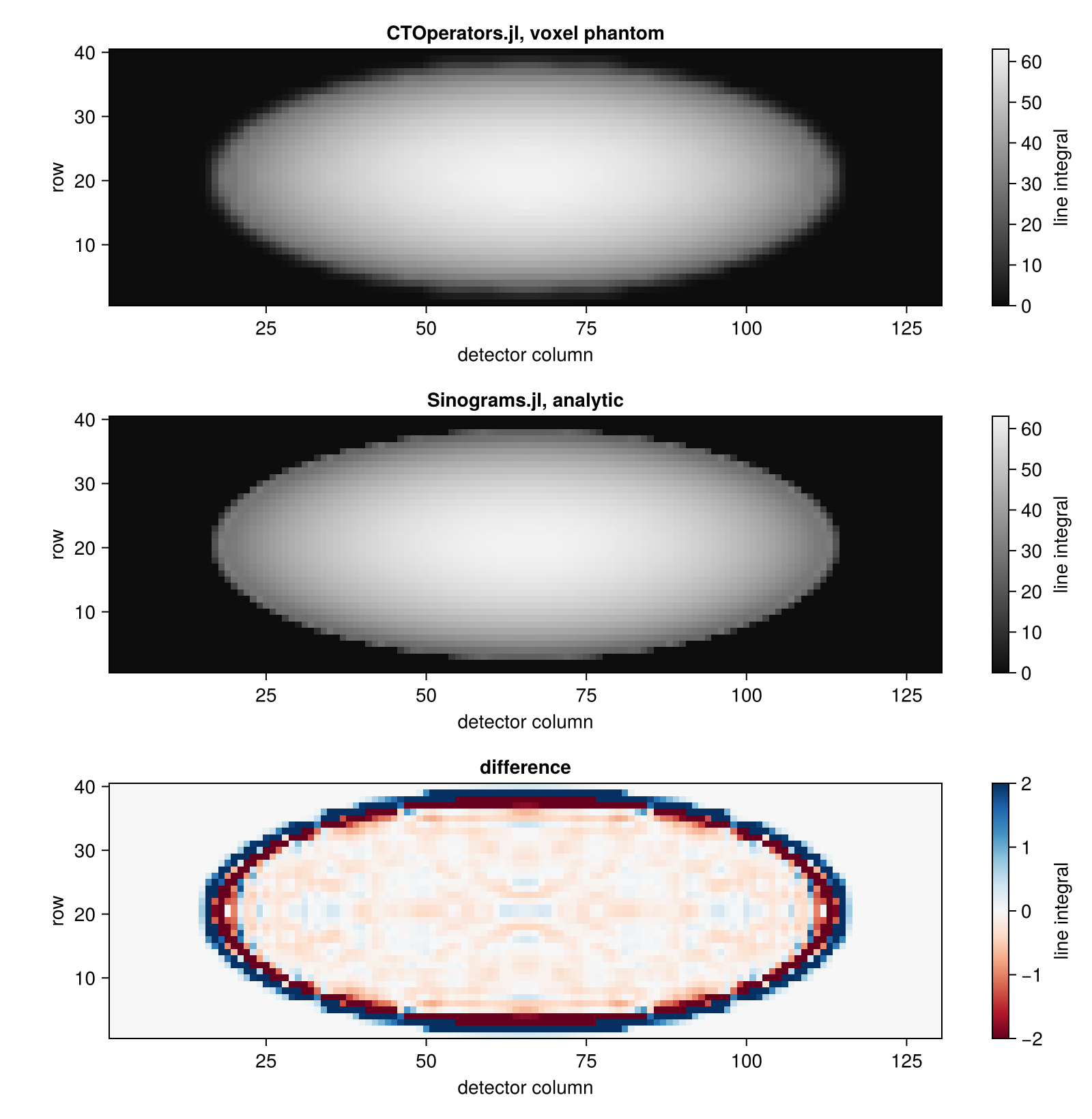
A helical scan
Sinograms.jl describes helical scans (CtSourceHelix; the pitch is a fraction of the axial field of view per turn), but its FDK assumes a circular orbit. The projectors handle any trajectory, so an iterative method reconstructs the helical scan. Here four turns over a volume that is taller than the field of view of one turn:
rg_helix = CtFanArc(; ns=130, ds=0.6, nt=40, dt=0.8, na=4 * 64, orbit=4 * 360, dsd=400, dod=100,
                    src=CtSourceHelix(; pitch=1.0, source_z0=-48))
image = ImageGeom(; dims=(64, 64, 64), deltas=(1.0, 1.0, 1.0))
objects = ellipsoid(ellipsoid_parameters(; fovs=(64, 64, 64)))
x_true = Float32.(phantom(axis(image, 1), axis(image, 2), axis(image, 3), objects, 2));
Sinograms' rays covers circular orbits only, so the data comes from the projector, applied to the phantom on a grid twice as fine (so that the reconstruction does not use the model that made the data):
fine = ImageGeom(; dims=(128, 128, 128), deltas=(0.5, 0.5, 0.5))
x_fine = Float32.(phantom(axis(fine, 1), axis(fine, 2), axis(fine, 3), objects, 2))
y = JosephProjector(fine, rg_helix) * x_fine;
CGNR with the projector on the reconstruction grid, and for comparison Sinograms' FDK, which treats the scan as circular:
op = JosephProjector(image, rg_helix)
solver = createLinearSolver(CGNR, op; iterations=20)
x_cg = reshape(solve!(solver, vec(y)), size(x_true))
x_fdk = Float32.(fdk(plan_fbp(rg_helix, image), y));
Axial (top) and sagittal (bottom, z from bottom to top) slices: CGNR recovers the whole volume (with some ringing at the skull, where the voxel model cannot match the finer data); FDK sees only a band of slices, smeared by the motion of the source.
fig = Figure(size=(900, 600))
for (j, (name, img)) in enumerate((("phantom", x_true), ("CGNR, helix", x_cg), ("FDK, circle assumed", x_fdk)))
  heatmap(fig[1, j], img[:, :, 32]; colormap=:grays, colorrange=(0, 1.2), axis=(; title=name, aspect=DataAspect()))
  heatmap(fig[2, j], img[32, :, :]; colormap=:grays, colorrange=(0, 1.2), axis=(; aspect=DataAspect()))
end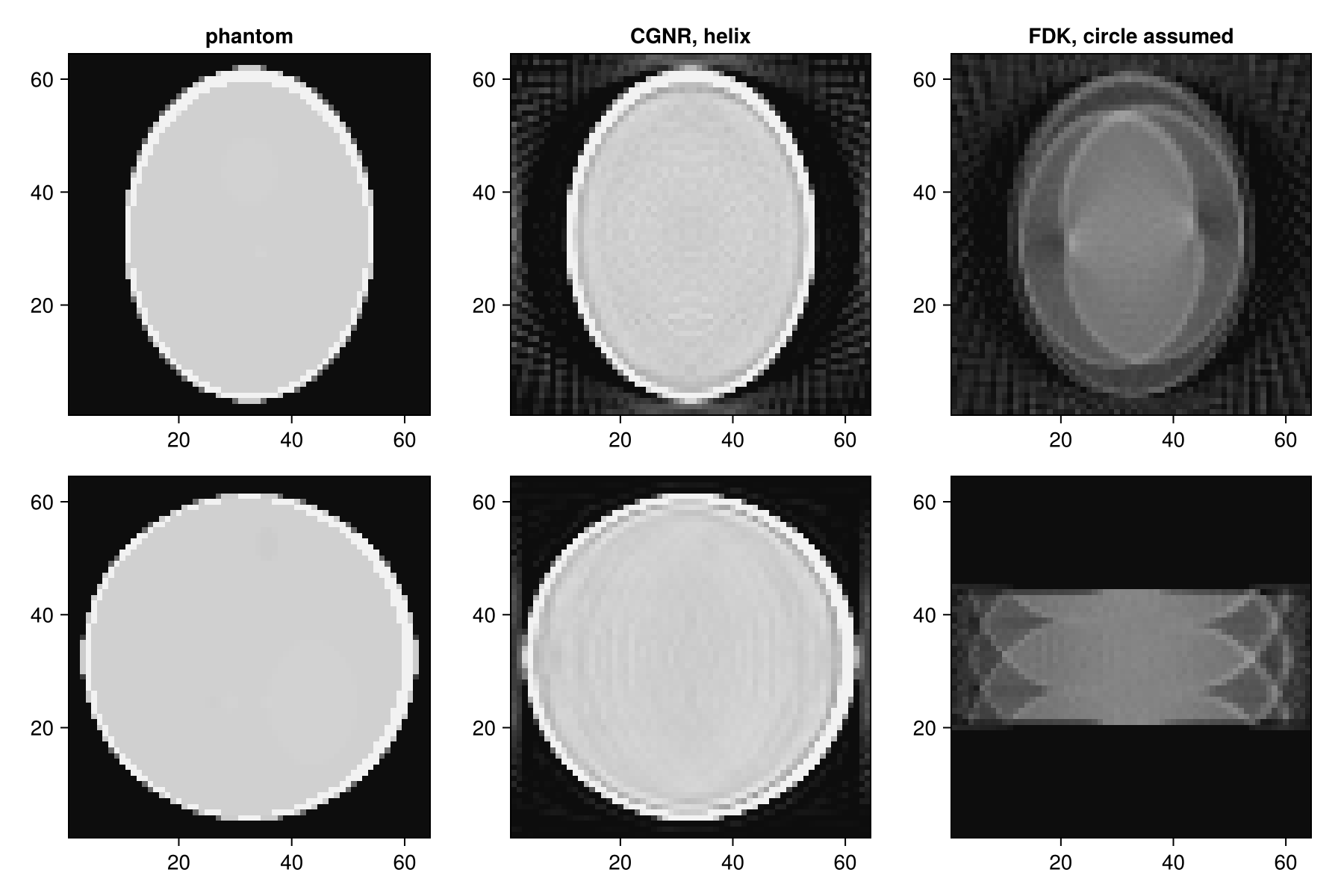
Supported geometries
| Sinograms.jl | CTOperators.jl |
|---|---|
CtFanFlat (circular or helical source) | ConeBeam |
CtFanArc (circular or helical source) | ArcConeBeam |
CtPar | ParallelBeam |
SinoFanFlat, SinoFanArc, SinoPar (2D) | the same, with one detector row at z = 0 |
2D data has the shape (nb, 1, na), Sinograms' (nb, na) with a detector row in the middle. The Mojette geometries are not supported.
In Sinograms.jl 0.5, the parallel-beam coordinates that rays returns for CtFanFlat have the wrong sign of the polar angle (the ray mirrored at the central detector row), so analytic projections with radon(rays(rg), objects) do not match flat-panel data. Arc detectors and parallel beams are not affected, nor is the geometry that CTOperators.jl builds from CtFanFlat.
This page was generated using Literate.jl.